A second language for extensions
Everything so far was xTalk script. OXT-Beyond has a second language, xTalk Builder (the language of .lcb files, known from LiveCode as LiveCode Builder), for writing extensions: libraries that add commands and functions, and widgets, new kinds of control that draw themselves. Most of the libraries and widgets in the Extensions folder are written in it, and it can call code written in C directly, which is how OXT-Beyond's own libsodium, ENet and Box2D extensions are made.
It reads much like xTalk, with three big differences:
- It is compiled ahead of time into a module (a
.lcmfile) bylc-compile, which finds many mistakes before anything runs. - It is typed: every variable and parameter is declared with its type, such as
String,Number,Integer,Boolean,List,ArrayorData, and must be declared before it is used. - It has no chunks of objects on cards: a library works with values, and a widget draws on a canvas.
A library
A library module begins with library and a unique name in reverse-domain form, has metadata for the Extension Manager, and makes the handlers marked public available to every script once it is loaded:
library org.openxtalk.lessons.greeting

metadata title is "Greeting"
metadata author is "OXT-Beyond lessons"
metadata version is "1.0.0"

public handler lessonGreeting(in pName as String) returns String
   return "Hello, " & pName & ", from xTalk Builder"
end handler

public handler lessonTotal(in pList as String) returns Number
   variable tParts as List
   variable tPart as String
   variable tNumber as optional Number
   variable tTotal as Number
   split pList by "," into tParts
   put 0 into tTotal
   repeat for each element tPart in tParts
      put tPart parsed as number into tNumber
      if tNumber is nothing then
         throw "not a number: " & tPart
      end if
      add tNumber to tTotal
   end repeat
   return tTotal
end handler

end library
Some things to notice: in before a parameter says the value only comes in (out and inout send one back); a List is a sequence of values, gone through with repeat for each element; parsed as number gives nothing for text that is not a number, which is why tNumber is an optional Number; and throw stops with an error the calling script can catch.
Once the module is loaded (the IDE loads installed extensions as it starts), its handlers are called from script like any function:
put lessonGreeting("Ada")
put lessonTotal("1,2,3.5")
try
   put lessonTotal("1,two")
catch tError
   put "lessonTotal refused the list"
end tryHello, Ada, from xTalk Builder 6.5 lessonTotal refused the list
A widget
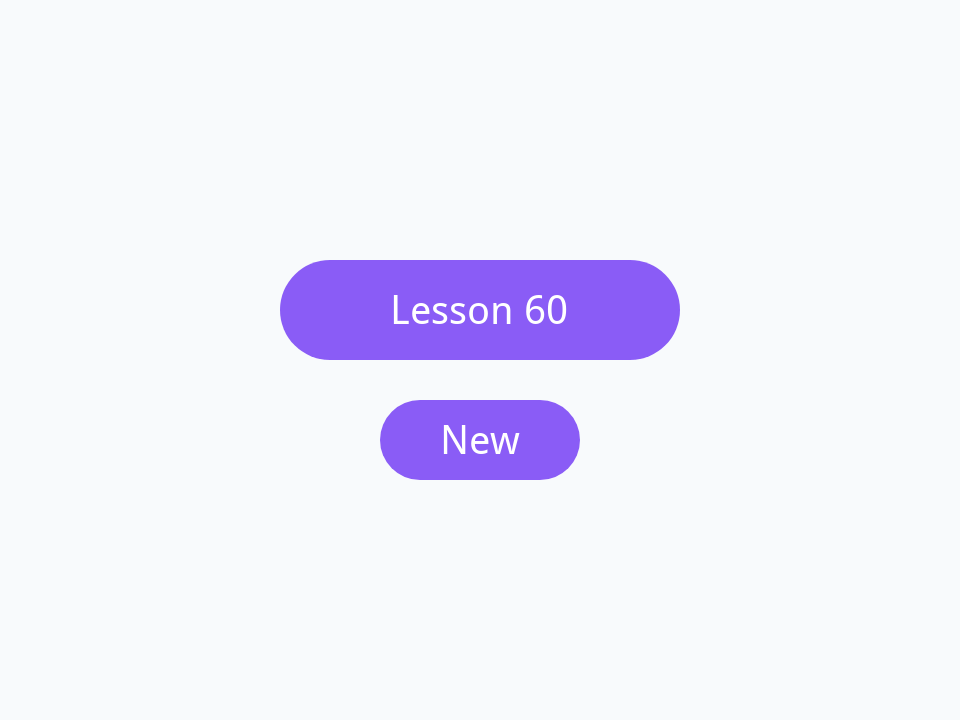
A widget is a control whose looks and behaviour you write. Its module begins with widget, and the engine sends it messages: OnCreate when one is made, OnPaint whenever it must be drawn, OnMouseUp when it is clicked, and others. A property line makes a property that scripts set and get, with handlers for each; after a change that affects the looks, redraw all asks for a new OnPaint. This badge draws a rounded violet label:
widget org.openxtalk.lessons.badge

metadata title is "Badge"
metadata author is "OXT-Beyond lessons"
metadata version is "1.0.0"

use com.livecode.canvas
use com.livecode.widget
use com.livecode.engine

property badgeText get mText set setBadgeText

private variable mText as String

public handler OnCreate()
   put "New" into mText
end handler

public handler setBadgeText(in pText as String)
   put pText into mText
   redraw all
end handler

public handler OnPaint()
   variable tBounds as Rectangle
   put my bounds into tBounds
   set the paint of this canvas to solid paint with color [0.545, 0.361, 0.965]
   fill rounded rectangle path of tBounds with radius my height / 2 on this canvas
   set the paint of this canvas to solid paint with color [1, 1, 1]
   set the font of this canvas to font "Droid Sans" at size 20
   fill text mText at center of tBounds on this canvas
end handler

public handler OnMouseUp()
   post "mouseUp" with [1]
end handler

end widget
A widget is made with create widget and its module's name, and then is a control like any other: it has a rect, it can be moved and hidden, it has the properties its module declares, and its script gets the mouseUp the module posts:
create widget "Title" as "org.openxtalk.lessons.badge"
set the rect of it to 140,130,340,180
set the badgeText of it to "Lesson 60"

create widget "Fresh" as "org.openxtalk.lessons.badge"
set the rect of it to 190,200,290,240

put the badgeText of widget "Title"
put the badgeText of widget "Fresh"
put the kind of widget "Title"Lesson 60 New org.openxtalk.lessons.badge
Calling C directly
A foreign handler declares a function from a C library, with the C types of its parameters and result; the module then calls it like any handler, inside an unsafe block, because the compiler cannot check what C code does. Here the C library's strlen counts the bytes of text sent as UTF-8:
library org.openxtalk.lessons.ccount

metadata title is "C count"
metadata author is "OXT-Beyond lessons"
metadata version is "1.0.0"

use com.livecode.foreign

foreign handler C_strlen(in pText as ZStringUTF8) returns CSInt binds to "c:strlen"

public handler lessonByteCount(in pText as String) returns Integer
   variable tCount as Integer
   unsafe
      put C_strlen(pText) into tCount
   end unsafe
   return tCount
end handler

end libraryput lessonByteCount("cafe")
put lessonByteCount("café")4 5
binds to "c:strlen" names the function; for a library of your own it is "c:mylibrary>my_function", and the compiled library goes in the extension's code folder, a folder for each platform, such as code/x86_64-linux and code/x86_64-win32.
Building and sharing an extension
In the IDE, Tools > Extension Builder opens a .lcb file, compiles it, shows the errors on their lines, and with Test loads it and makes a test stack (for a widget, with one on it). Install adds it to the IDE for good, and Package makes a .lce file to give to others. A script can load a compiled module itself with load extension from file, which is how a standalone carries one, and the Standalone Application Settings include the extensions it uses.
The xTalk Builder reference is in the Dictionary, under the LCB entries, and the extensions in the IDE's Extensions folder, including OXT-Beyond's own, are good examples to read.
Try it yourself
Add a library with a public handler lessonReverseWords that takes a String and returns its words in reverse order. In xTalk Builder, split by a space into a List, go through it with repeat with from the end, and combine the result with spaces. Use it from script on one small step for a cat.
Show a solution
library org.openxtalk.lessons.reverse

metadata title is "Reverse words"
metadata author is "OXT-Beyond lessons"
metadata version is "1.0.0"

public handler lessonReverseWords(in pText as String) returns String
   variable tWords as List
   variable tReversed as List
   variable tIndex as Integer
   variable tResult as String
   split pText by " " into tWords
   put [] into tReversed
   repeat with tIndex from the number of elements in tWords down to 1
      push tWords[tIndex] onto back of tReversed
   end repeat
   combine tReversed with " " into tResult
   return tResult
end handler

end libraryput lessonReverseWords("one small step for a cat")cat a for step small one
Words in this lesson
xTalk BuilderLCBlibrarywidgetmodulehandlervariableas StringListoptionalOnPaintOnCreatepropertyredraw allpostforeign handlerunsafeload extensioncreate widgetEach one finds every lesson that uses it. The Dictionary has the whole story of each, with its syntax and more examples.