A table is lines and items
The xTalk way to keep a table is text: a line for each row, and the row's values as items, separated by tabs. Tabs, because values often contain commas but almost never tabs. Every chunk expression then works on the table: line 3 is the third row, and item 2 of line 3, with the itemDelimiter set to tab, one value.
put "Tea" & tab & "2" & tab & "1.80" & return & \
      "Cake" & tab & "1" & tab & "3.25" & return & \
      "Juice" & tab & "3" & tab & "2.00" into tOrder
set the itemDelimiter to tab

put item 1 of line 2 of tOrder
put 0 into tTotal
repeat for each line tRow in tOrder
   add item 2 of tRow * item 3 of tRow to tTotal
end repeat
put "total:" && tTotal
sort lines of tOrder numeric descending by item 3 of each
put item 1 of line 1 of tOrder && "costs the most"Cake total: 12.85 Cake costs the most
CSV: comma-separated values
Spreadsheets and databases swap tables as CSV. It looks simple, a comma between values, but a value can itself hold a comma, a quote or even a line break. Then the value is put in double quotes, and a quote inside it is doubled:
Name,Note
Ada,"Lovelace, Countess"
Grace,"She said ""hi"""
So splitting at every comma breaks such a file. Reading CSV properly means going through it a character at a time, remembering whether you are inside quotes. This function turns CSV into the xTalk table, tab-separated:
function csvToTable pCSV
   local tTable, tValue, tInQuotes, tChar, tPrevious
   put false into tInQuotes
   repeat for each char tChar in pCSV
      if tInQuotes then
         if tChar is quote then
            put false into tInQuotes
         else
            put tChar after tValue
         end if
      else
         switch tChar
            case quote
               -- a quote straight after a closing one is a quote in the value
               if tPrevious is quote then put quote after tValue
               put true into tInQuotes
               break
            case comma
               put tValue & tab after tTable
               put empty into tValue
               break
            case return
               put tValue & return after tTable
               put empty into tValue
               break
            default
               put tChar after tValue
         end switch
      end if
      put tChar into tPrevious
   end repeat
   return tTable & tValue
end csvToTable

put "Name,Note" & return & "Ada,'Lovelace, Countess'" & return & "Grace,'She said ''hi'''" into tCSV
replace "'" with quote in tCSV
put csvToTable(tCSV) into tTable
set the itemDelimiter to tab
put the number of lines of tTable && "rows"
put item 2 of line 2 of tTable
put item 2 of line 3 of tTable3 rows Lovelace, Countess She said "hi"
A line break inside quotes is kept in the value too, since only a return outside quotes ends a row. (A tab inside a value would split it in the table; replace tabs in values first if your data may have them.)
Writing CSV
Writing is easier: put a value in quotes when it holds a comma, a quote or a line break, doubling any quotes inside it:
function csvValue pText
   if pText contains comma or pText contains quote or pText contains return then
      replace quote with quote & quote in pText
      return quote & pText & quote
   end if
   return pText
end csvValue

function tableToCSV pTable
   local tCSV, tRow, tValue
   set the itemDelimiter to tab
   repeat for each line tRow in pTable
      repeat for each item tValue in tRow
         put csvValue(tValue) & comma after tCSV
      end repeat
      put return into the last char of tCSV
   end repeat
   delete the last char of tCSV
   return tCSV
end tableToCSV

put "Name" & tab & "Note" & return & "Ada" & tab & "Lovelace, Countess" & return & \
      "Grace" & tab & "She said" && quote & "hi" & quote into tTable
put tableToCSV(tTable)Name,Note Ada,"Lovelace, Countess" Grace,"She said ""hi"""
Reading that back with csvToTable gives the same table: the round trip loses nothing, which is the test of a CSV reader and writer.
Showing a table in a field
A field shows tab-separated text as columns when you set its tabStops, the positions of the columns from its left edge. vGrid and hGrid draw lines between columns and rows, and a line can have its own style and colour, which makes a header row:
put "Name" & tab & "Born" & tab & "Known for" & return & \
      "Ada Lovelace" & tab & "1815" & tab & "the first program" & return & \
      "Grace Hopper" & tab & "1906" & tab & "the first compiler" & return & \
      "Alan Turing" & tab & "1912" & tab & "the Turing machine" into tTable

create field "People"
set the rect of it to 20,20,460,92
set the tabStops of it to 140,200,440
set the vGrid of it to true
set the hGrid of it to true
set the text of it to tTable
set the textStyle of line 1 of it to "bold"
set the backgroundColor of line 1 of it to "#E2E8F0"

set the itemDelimiter to tab
put item 3 of line 3 of field "People"the first compiler
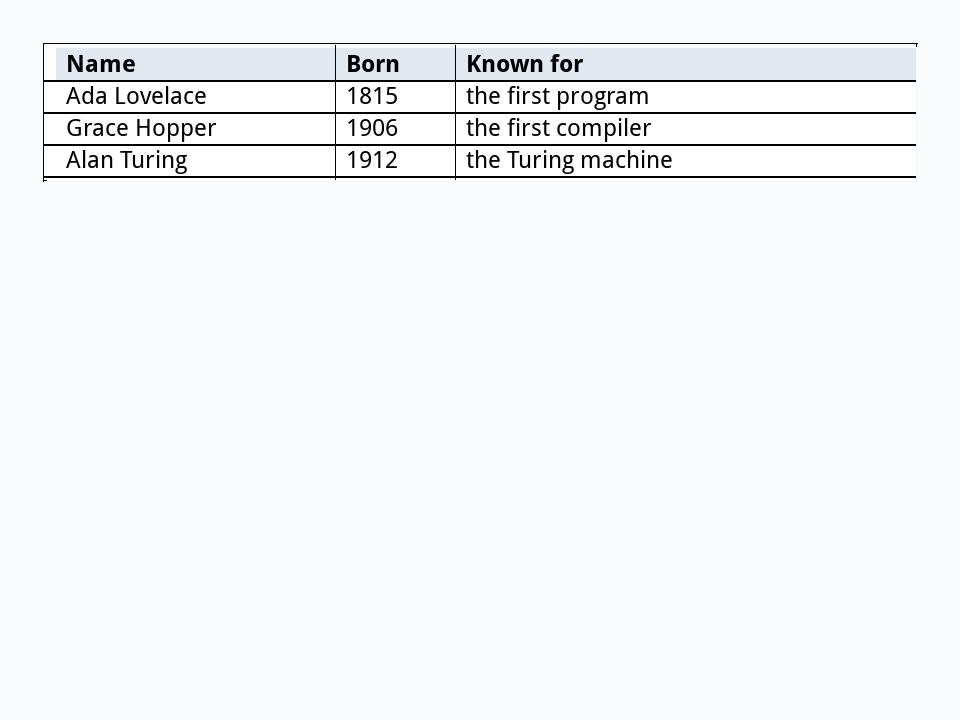
The field's text is still the plain table, so everything in this lesson works on it directly. For tables the user edits cell by cell, with sorting by a click on a column, the IDE's Tools palette has the Data Grid, built on the same ideas.
Try it yourself
This CSV lists sales: Region,Month,Amount, then North,Jan,120, South,Jan,80, North,Feb,95, "South, coast",Feb,60 and South,Feb,40. Read it with csvToTable and put the total for each region, a line each, sorted by region.
Show a solution
function csvToTable pCSV
   local tTable, tValue, tInQuotes, tChar, tPrevious
   put false into tInQuotes
   repeat for each char tChar in pCSV
      if tInQuotes then
         if tChar is quote then
            put false into tInQuotes
         else
            put tChar after tValue
         end if
      else
         switch tChar
            case quote
               if tPrevious is quote then put quote after tValue
               put true into tInQuotes
               break
            case comma
               put tValue & tab after tTable
               put empty into tValue
               break
            case return
               put tValue & return after tTable
               put empty into tValue
               break
            default
               put tChar after tValue
         end switch
      end if
      put tChar into tPrevious
   end repeat
   return tTable & tValue
end csvToTable

put "Region,Month,Amount" & return & "North,Jan,120" & return & "South,Jan,80" & return & \
      "North,Feb,95" & return & "'South, coast',Feb,60" & return & "South,Feb,40" into tCSV
replace "'" with quote in tCSV
put csvToTable(tCSV) into tTable
delete line 1 of tTable

set the itemDelimiter to tab
repeat for each line tRow in tTable
   add item 3 of tRow to tTotals[item 1 of tRow]
end repeat
put the keys of tTotals into tRegions
sort tRegions
repeat for each line tRegion in tRegions
   put tRegion & ":" && tTotals[tRegion]
end repeatNorth: 215 South: 120 South, coast: 60
South, coast is a region of its own: with a plain split at commas, it would have become a region called "South and broken the row.
Words in this lesson
Each one finds every lesson that uses it. The Dictionary has the whole story of each, with its syntax and more examples.