When a file is not enough
A text file or a JSON file holds a few hundred records well. Thousands of records that you search, sort, update one at a time and must never lose belong in a database. SQLite keeps a whole database in one file, needs no server, and comes with OXT-Beyond; you talk to it in SQL, the language every relational database understands.
The database commands begin with rev, and come from an external the IDE loads as it starts, so a standalone that uses them needs Database and the SQLite driver ticked in its settings (Shipping your program).
Opening a database and making a table
revOpenDatabase("sqlite", path) opens the file, making it if it is not there, and returns a connection number to use with every other command; anything that is not a number is an error. revExecuteSQL runs SQL that changes something, and leaves the number of rows changed, or an error, in the result:
put specialFolderPath("temporary") & "/oxt-lesson.sqlite" into tPath
put revOpenDatabase("sqlite", tPath) into tDB
if tDB is not an integer then
   put "could not open it:" && tDB
else
   revExecuteSQL tDB, "CREATE TABLE IF NOT EXISTS people (name TEXT, born INTEGER)"
   revExecuteSQL tDB, "INSERT INTO people VALUES ('Ada Lovelace', 1815)"
   put "rows added:" && the result
   revCloseDatabase tDB
   put "the file is there:" && (there is a file tPath)
   delete file tPath
end ifrows added: 1 the file is there: true
For a database that lasts only while the program runs (a cache, a quick sort of a big list), open ":memory:" instead of a path, as the rest of this lesson does.
Inserting safely: placeholders
Never build SQL by joining in values: a name such as O'Brien breaks it, and a value typed by a stranger can turn into SQL of their own, which is called SQL injection. Write :1, :2 and so on where the values go, and give the names of the variables that hold them after the SQL. The values then never become part of the SQL, whatever they contain:
put revOpenDatabase("sqlite", ":memory:") into tDB
revExecuteSQL tDB, "CREATE TABLE people (name TEXT, born INTEGER)"

put "Ada Lovelace,1815" & return & "Grace Hopper,1906" & return & \
      "Alan Turing,1912" & return & "Seán O'Brien,1970" into tPeople
repeat for each line tPerson in tPeople
   put item 1 of tPerson into tName
   put item 2 of tPerson into tBorn
   revExecuteSQL tDB, "INSERT INTO people (name, born) VALUES (:1, :2)", "tName", "tBorn"
end repeat

put revDataFromQuery(comma, return, tDB, "SELECT count(*) FROM people")
put revDataFromQuery(comma, return, tDB, "SELECT name FROM people WHERE born > 1900 ORDER BY born")
revCloseDatabase tDB4 Grace Hopper Alan Turing Seán O'Brien
Asking questions: revDataFromQuery
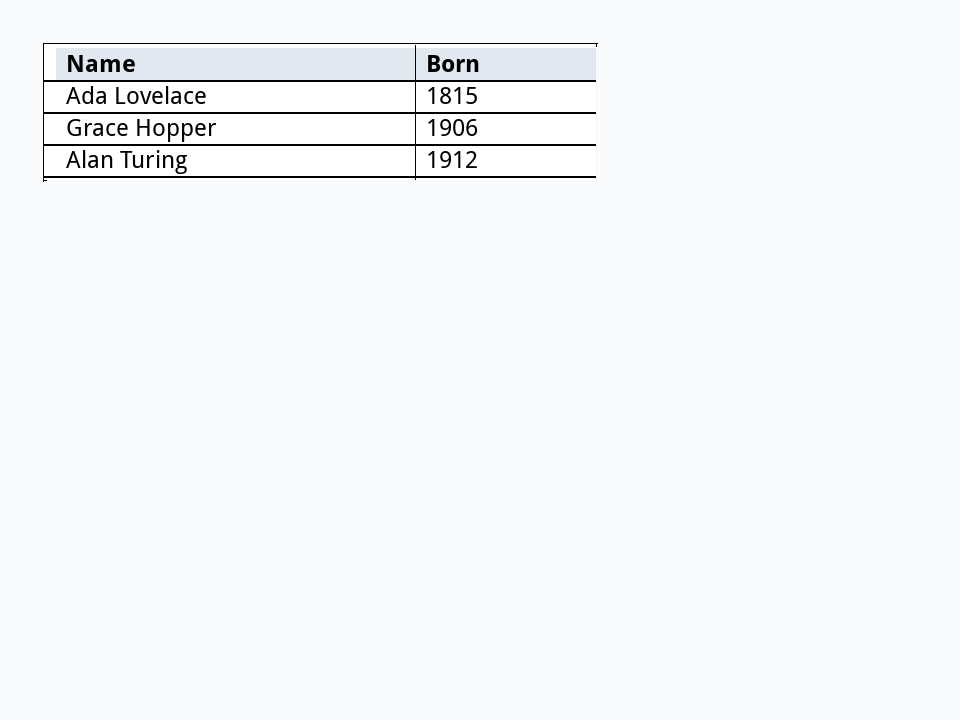
revDataFromQuery runs a SELECT and returns the answer as text: the columns separated by the first delimiter, the rows by the second. With a tab and a return, that is the xTalk table of Tables and CSV, ready for a table field. Placeholders work here too:
put revOpenDatabase("sqlite", ":memory:") into tDB
revExecuteSQL tDB, "CREATE TABLE people (name TEXT, born INTEGER)"
revExecuteSQL tDB, "INSERT INTO people VALUES ('Alan Turing', 1912), ('Ada Lovelace', 1815), ('Linus Torvalds', 1969), ('Grace Hopper', 1906)"

put 1950 into tBefore
put revDataFromQuery(tab, return, tDB, "SELECT name, born FROM people WHERE born < :1 ORDER BY born", "tBefore") into tRows
revCloseDatabase tDB

create field "Results"
set the rect of it to 20,20,300,92
set the tabStops of it to 180,280
set the vGrid of it to true
set the hGrid of it to true
set the text of it to "Name" & tab & "Born" & return & tRows
set the textStyle of line 1 of it to "bold"
set the backgroundColor of line 1 of it to "#E2E8F0"
put the number of lines of tRows && "people born before" && tBefore3 people born before 1950
Record by record: cursors
For a big answer, or when you want each column by its name, revQueryDatabase returns a cursor: a place in the answer that you move through a record at a time. revDatabaseColumnNamed reads a column of the current record, revMoveToNextRecord moves on, and revQueryIsAtEnd says when there are no more. Close the cursor when you are done:
put revOpenDatabase("sqlite", ":memory:") into tDB
revExecuteSQL tDB, "CREATE TABLE people (name TEXT, born INTEGER)"
revExecuteSQL tDB, "INSERT INTO people VALUES ('Ada Lovelace', 1815), ('Grace Hopper', 1906)"

put revQueryDatabase(tDB, "SELECT name, born FROM people ORDER BY born DESC") into tCursor
repeat until revQueryIsAtEnd(tCursor)
   put revDatabaseColumnNamed(tCursor, "name") && "was born in" && revDatabaseColumnNamed(tCursor, "born")
   revMoveToNextRecord tCursor
end repeat
revCloseCursor tCursor
revCloseDatabase tDBGrace Hopper was born in 1906 Ada Lovelace was born in 1815
Errors
SQL with a mistake in it does not stop the script: revExecuteSQL leaves the database's words in the result, and revDataFromQuery returns them, starting with revdberr. Check both:
put revOpenDatabase("sqlite", ":memory:") into tDB
revExecuteSQL tDB, "INSERT INTO nowhere VALUES (1)"
put "execute:" && the result
put revDataFromQuery(comma, return, tDB, "SELECT * FROM nowhere") into tAnswer
if tAnswer begins with "revdberr" then put "query:" && item 2 to -1 of tAnswer
revCloseDatabase tDBexecute: no such table: nowhere query: Database Error: no such table: nowhere
Many changes at once: transactions
A transaction groups changes so that they all happen, or none do: a transfer takes from one account and adds to another, never just one of the two. Begin one with BEGIN, and end it with COMMIT to keep the changes or ROLLBACK to undo them. It is also much faster for many inserts, because the file is written once instead of once a row:
put revOpenDatabase("sqlite", ":memory:") into tDB
revExecuteSQL tDB, "CREATE TABLE numbers (n INTEGER)"
revExecuteSQL tDB, "BEGIN"
repeat with i = 1 to 1000
   revExecuteSQL tDB, "INSERT INTO numbers VALUES (:1)", "i"
end repeat
revExecuteSQL tDB, "COMMIT"
put revDataFromQuery(comma, return, tDB, "SELECT count(*), sum(n) FROM numbers")

revExecuteSQL tDB, "BEGIN"
revExecuteSQL tDB, "DELETE FROM numbers"
revExecuteSQL tDB, "ROLLBACK"
put revDataFromQuery(comma, return, tDB, "SELECT count(*) FROM numbers") && "rows survived the undone delete"
revCloseDatabase tDB1000,500500 1000 rows survived the undone delete
Other databases
The same commands work with database servers: "mysql" (and MariaDB), "postgresql" and "odbc", with a host, a database name, a user and a password. Only the opening changes:
on mouseUp
   local tDB
   put revOpenDatabase("postgresql", "db.example.com", "shop", "reader", the cPassword of me) into tDB
   if tDB is not an integer then
      answer "Could not connect:" && tDB
      exit mouseUp
   end if
   put revDataFromQuery(tab, return, tDB, "SELECT name, price FROM products ORDER BY name") into field "Products"
   revCloseDatabase tDB
end mouseUp
Try it yourself
Make a scores table (player and points) in memory, add the scores Kim 40, Lee 75, Kim 55, Raj 60 and Lee 20 with placeholders, then ask SQL for each player's total, highest first, and put the answer as name: total lines.
Show a solution
put revOpenDatabase("sqlite", ":memory:") into tDB
revExecuteSQL tDB, "CREATE TABLE scores (player TEXT, points INTEGER)"
repeat for each item tScore in "Kim 40,Lee 75,Kim 55,Raj 60,Lee 20"
   put word 1 of tScore into tPlayer
   put word 2 of tScore into tPoints
   revExecuteSQL tDB, "INSERT INTO scores VALUES (:1, :2)", "tPlayer", "tPoints"
end repeat
put revDataFromQuery(": ", return, tDB, \
      "SELECT player, sum(points) AS total FROM scores GROUP BY player ORDER BY total DESC, player")
revCloseDatabase tDBKim: 95 Lee: 95 Raj: 60
Kim and Lee tie on 95. SQL leaves tied rows in no fixed order, so the query adds a second rule after the comma: ties go in order of the player's name.
Words in this lesson
revOpenDatabaserevExecuteSQLrevDataFromQueryrevQueryDatabaserevDatabaseColumnNamedrevMoveToNextRecordrevQueryIsAtEndrevCloseCursorrevCloseDatabaseSQLSQLiteEach one finds every lesson that uses it. The Dictionary has the whole story of each, with its syntax and more examples.