A world that moves by itself
Box2D is the physics engine inside many of the best-known 2D games: it moves things the way real things move, falling, bouncing, stacking, swinging and knocking each other over. The xTalk Suite's Box2Dxt brings it to xTalk, with handlers that begin with b2. This lesson uses Box2D's own handlers, which work in metres and radians; the next, Games with the Box2Dxt Kit, uses the Kit, which works in pixels and moves the controls of a card for you.
Three ideas carry it all. A world holds everything, with one gravity. Bodies are the things in it, and shapes give them their form and what they are made of. Then you step the world, and each step moves time on a little.
A world and a falling ball
b2NewWorld makes a world, given its gravity across and up: Box2D's y goes up, so -10 is ten metres a second, every second, down. (The two trues let bodies at rest fall asleep, which costs nothing, and keep fast bodies from passing through walls.) b2NewBody makes a body: its world, its type (2 is dynamic: gravity moves it), where it is in metres, and its angle. b2AddCircle gives it a round shape, half a metre in radius. Each b2Step moves time on by the seconds you give, 1/60 for a game running at 60 frames a second:
put b2NewWorld(0, -10, true, true) into tWorld
put b2NewBody(tWorld, 2, 0, 20, 0, false, false) into tBall
get b2AddCircle(tBall, 0, 0, 0.5, 1, 0.3, 0)
repeat with tStep = 1 to 60
   b2Step tWorld, 1/60, 4
   if tStep mod 20 is 0 then
      put round(tStep / 60, 2) && "s: height" && round(b2BodyY(tBall), 1) && "m, speed" && round(b2BodyVY(tBall), 1) && "m/s"
   end if
end repeat
b2DestroyWorld tWorld0.33 s: height 19.4 m, speed -3.3 m/s 0.67 s: height 17.8 m, speed -6.7 m/s 1 s: height 15 m, speed -10 m/s
Every second the ball falls 10 metres a second faster, as a dropped stone does. b2DestroyWorld frees the world and everything in it when you are done.
Ground, and three kinds of body
A body's type says how it moves. A static body (0) never moves: floors, walls, shelves. A kinematic body (1) moves at the speed you give it with b2SetVelocity, and nothing pushes it: lifts and moving platforms. A dynamic body (2) is moved by gravity and by whatever it hits. A static body with a segment shape, a line from one point to another, makes a floor:
put b2NewWorld(0, -10, true, true) into tWorld
put b2NewBody(tWorld, 0, 0, 0, 0, false, false) into tGround
get b2AddSegment(tGround, -10, 0, 10, 0, 0.6, 0)
put b2NewBody(tWorld, 2, 0, 5, 0, false, false) into tCrate
get b2AddBox(tCrate, 0.5, 0.5, 1, 0.6, 0)
put b2NewBody(tWorld, 1, -5, 3, 0, false, false) into tLift
get b2AddBox(tLift, 1, 0.1, 1, 0.6, 0)
b2SetVelocity tLift, 2, 0
repeat 120 times
   b2Step tWorld, 1/60, 4
end repeat
put "the crate rests at height" && round(b2BodyY(tCrate), 2)
put "the lift is at" && round(b2BodyX(tLift), 1) & "," && round(b2BodyY(tLift), 1)
put "the ground is at" && b2BodyX(tGround) & "," && b2BodyY(tGround)
put item b2BodyType(tLift) + 1 of "static,kinematic,dynamic"
b2DestroyWorld tWorldthe crate rests at height 0.5 the lift is at -1, 3 the ground is at 0, 0 kinematic
A box is given by half its width and half its height, so the crate is a metre square, and it rests with its middle half a metre above the floor. The lift kept its speed for two seconds and went 4 metres, gravity or not.
What things are made of
The last three numbers of a shape are its density (how heavy it is for its size), its friction (how it grips) and its restitution, its bounce: 0 is a lump of clay, 1 a perfect rubber ball. Drop two balls from the same height, one of clay and one of rubber, and see where each is a second and a half later:
put b2NewWorld(0, -10, true, true) into tWorld
put b2NewBody(tWorld, 0, 0, 0, 0, false, false) into tGround
get b2AddSegment(tGround, -10, 0, 10, 0, 0.6, 0)
put b2NewBody(tWorld, 2, -2, 5, 0, false, false) into tClay
get b2AddCircle(tClay, 0, 0, 0.5, 1, 0.6, 0)
put b2NewBody(tWorld, 2, 2, 5, 0, false, false) into tRubber
get b2AddCircle(tRubber, 0, 0, 0.5, 1, 0.6, 0.8)
repeat 90 times
   b2Step tWorld, 1/60, 4
end repeat
put "clay:" && round(b2BodyY(tClay), 1) && "m up"
put "rubber:" && (b2BodyY(tRubber) > 1.5) && "that it is in the air"
b2DestroyWorld tWorldclay: 0.5 m up rubber: true that it is in the air
Pushes and kicks
To make a body move, give it a speed with b2SetVelocity, push it over time with b2ApplyForce, or kick it once with b2ApplyImpulse, which changes its speed at once by the impulse divided by its mass. A ball kicked up and sideways flies in a curve, the way a thrown ball does; b2SetGravity changes the world's gravity at any time:
put b2NewWorld(0, -10, true, true) into tWorld
put b2NewBody(tWorld, 2, 0, 0, 0, false, false) into tBall
get b2AddCircle(tBall, 0, 0, 0.5, 1, 0.3, 0)
put round(b2BodyMass(tBall), 2) && "kg"
b2ApplyImpulse tBall, 3, 10, true
b2Step tWorld, 1/60, 4
put "speed across" && round(b2BodyVX(tBall), 1) & ", up" && round(b2BodyVY(tBall), 1)
b2SetGravity tWorld, 0, 0
repeat 59 times
   b2Step tWorld, 1/60, 4
end repeat
put "with no gravity, still going up at" && round(b2BodyVY(tBall), 1)
b2DestroyWorld tWorld0.79 kg speed across 3.8, up 12.6 with no gravity, still going up at 12.6
Joints
A joint ties two bodies together. A revolute joint is a hinge: the bodies may turn about one point, as a door on its hinge or a pendulum on its pin. b2RevoluteJoint takes the world, the two bodies, the hinge's place on each (in each body's own metres) and whether they may collide. Hang a weight from a fixed pin, start it at the side, and it swings:
put b2NewWorld(0, -10, true, true) into tWorld
put b2NewBody(tWorld, 0, 0, 10, 0, false, false) into tPin
put b2NewBody(tWorld, 2, 3, 10, 0, false, false) into tWeight
get b2AddCircle(tWeight, 0, 0, 0.3, 1, 0.3, 0)
-- the hinge: at the pin's middle, and 3 m to the weight's left
put b2RevoluteJoint(tWorld, tPin, tWeight, 0, 0, -3, 0, false) into tHinge
put 0 into tLowest
repeat with tStep = 1 to 120
   b2Step tWorld, 1/60, 4
   put max(tLowest, 10 - b2BodyY(tWeight)) into tLowest
end repeat
put "it swung down" && round(tLowest, 1) && "m below the pin"
put "it stays 3 m away:" && round(sqrt(b2BodyX(tWeight) ^ 2 + (b2BodyY(tWeight) - 10) ^ 2), 2)
b2DestroyWorld tWorldit swung down 3 m below the pin it stays 3 m away: 3
A hinge can have limits and a motor, and Box2Dxt has the other joints too: distance joints (a rod, or a spring), sliders, wheels with suspension, welds and ropes. The Dictionary lists them all.
Contacts and rays
A game needs to know when things touch: a ball landing, a player reaching a coin. After each step, b2ContactsUpdate takes a snapshot of what began to touch, ended and hit hard in that step, and b2ContactBeginBodyA and b2ContactBeginBodyB say which two bodies began. A ray asks what lies along a line, as a laser or a line of sight would: b2CastRayClosest says whether it hit, and b2RayBody and b2RayY say what and where:
put b2NewWorld(0, -10, true, true) into tWorld
put b2NewBody(tWorld, 0, 0, 0, 0, false, false) into tGround
get b2AddSegment(tGround, -10, 0, 10, 0, 0.6, 0)
put b2NewBody(tWorld, 2, 0, 3, 0, false, false) into tBall
get b2AddCircle(tBall, 0, 0, 0.5, 1, 0.3, 0)
put empty into tLanded
repeat with tStep = 1 to 120
   b2Step tWorld, 1/60, 4
   repeat with tIndex = 1 to b2ContactsUpdate(tWorld)
      if tLanded is empty then
         put tStep into tLanded
         put b2ContactBeginBodyA(tIndex), b2ContactBeginBodyB(tIndex) into tPair
      end if
   end repeat
end repeat
put "it landed after about" && round(tLanded / 60, 1) && "seconds"
put tGround is among the items of tPair and tBall is among the items of tPair
if b2CastRayClosest(tWorld, 0, 10, 0, -10) then
   put b2RayBody() is tBall
   put "the ray hit at height" && round(b2RayY(), 2)
end if
b2DestroyWorld tWorldit landed after about 0.7 seconds true true the ray hit at height 1
Drawing it on a card
Box2D only works out where things are; drawing them is up to you. On a card, a graphic for each body, moved to its body's place after each step, is enough. A metre has to become some pixels, and Box2D's y, which goes up, has to become a card's, which goes down: here a metre is 40 pixels, and the point 0,0 of the world is at the middle of the card's bottom. This builds a little tower and a ball beside it, lets them settle for two seconds, and draws them where they came to rest:
function toCard pX, pY
   return round(240 + pX * 40), round(330 - pY * 40)
end toCard

put b2NewWorld(0, -10, true, true) into tWorld
put b2NewBody(tWorld, 0, 0, 0, 0, false, false) into tGround
get b2AddSegment(tGround, -6, 0, 6, 0, 0.6, 0)
repeat with tIndex = 1 to 4
   put b2NewBody(tWorld, 2, -1, tIndex * 1.05 - 0.4, 0, false, false) into tBox
   get b2AddBox(tBox, 0.5, 0.5, 1, 0.6, 0)
   put tBox & return after tBoxes
end repeat
put b2NewBody(tWorld, 2, 2.5, 3, 0, false, false) into tBall
get b2AddCircle(tBall, 0, 0, 0.6, 1, 0.6, 0.2)
repeat 120 times
   b2Step tWorld, 1/60, 4
end repeat

create graphic "Floor"
set the rect of it to toCard(-6, 0), toCard(6, -0.4)
set the opaque of it to true
set the backgroundColor of it to "#9eabbd"
repeat for each line tBox in tBoxes
   create graphic
   set the opaque of it to true
   set the backgroundColor of it to "#ff9b3d"
   set the rect of it to toCard(b2BodyX(tBox) - 0.5, b2BodyY(tBox) + 0.5), toCard(b2BodyX(tBox) + 0.5, b2BodyY(tBox) - 0.5)
end repeat
create graphic "Ball"
set the style of it to "oval"
set the opaque of it to true
set the backgroundColor of it to "#2bb5a5"
set the rect of it to toCard(b2BodyX(tBall) - 0.6, b2BodyY(tBall) + 0.6), toCard(b2BodyX(tBall) + 0.6, b2BodyY(tBall) - 0.6)
put "the tower stands" && round(b2BodyY(line 4 of tBoxes) + 0.5, 1) && "m high"
put "the ball rests at height" && round(b2BodyY(tBall), 1)
b2DestroyWorld tWorldthe tower stands 4 m high the ball rests at height 0.6
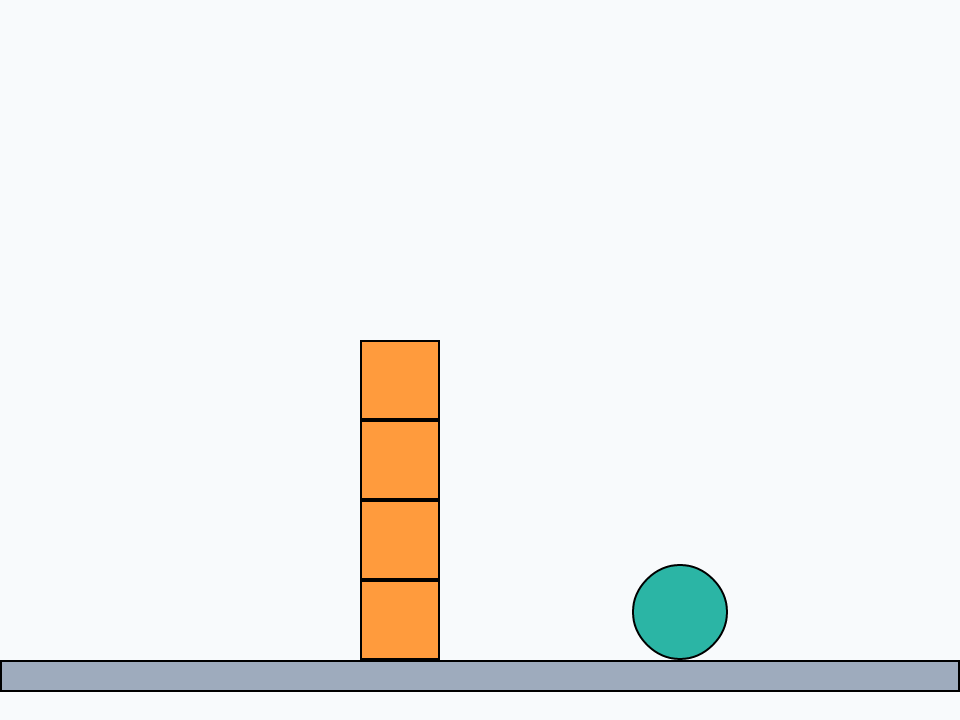
A game does the same 60 times a second, from a timer (Animation and games), and sets each graphic's points from its body's angle too, so that it turns. The Kit does all of this for you, which is why most games use it; Box2D's own handlers are there when you want full control. Learn Box2D (Help > Examples) has a live lesson for each idea here, with bodies you can drag and throw.
Try it yourself
A ball rolls off a table 1 metre high at 3 metres a second. Where does it land? Make the table a static box whose top is at height 1, start the ball on it moving at 3 across, and step until the ball's bottom touches the floor; put how far it landed from the table's edge.
Show a solution
put b2NewWorld(0, -10, true, true) into tWorld
put b2NewBody(tWorld, 0, -2, 0.5, 0, false, false) into tTable
get b2AddBox(tTable, 2, 0.5, 1, 0, 0)
put b2NewBody(tWorld, 2, -1, 1.1, 0, false, false) into tBall
get b2AddCircle(tBall, 0, 0, 0.1, 1, 0, 0)
b2SetVelocity tBall, 3, 0
repeat 600 times
   b2Step tWorld, 1/120, 4
   if b2BodyY(tBall) <= 0.1 then exit repeat
end repeat
put "it landed about" && round(b2BodyX(tBall), 1) && "m from the edge"
b2DestroyWorld tWorldit landed about 1.4 m from the edge
A body falls 1 metre in about 0.45 seconds whatever its speed across, so at 3 metres a second it lands a little over 1.3 metres out. The table has no friction, so the ball slides rather than rolls.
Words in this lesson
b2NewWorldb2Stepb2NewBodyb2AddBoxb2AddCircleb2AddSegmentb2BodyXb2BodyYb2BodyAngleb2BodyVYb2SetVelocityb2ApplyImpulseb2SetGravityb2RevoluteJointb2RevoluteAngleb2ContactsUpdateb2ContactBeginBodyAb2CastRayClosestb2RayBodyb2DestroyWorldEach one finds every lesson that uses it. The Dictionary has the whole story of each, with its syntax and more examples.