A property that works itself out
A custom property (Custom properties) holds whatever you put in it. A getprop handler goes further: when a script asks for the property, the handler runs, and what it returns is the property's value. The property can be worked out from others, so it is never out of date:
create button "Oven"
set the script of it to \
      "getprop fahrenheit" & return & \
      "   return the celsius of me * 9 / 5 + 32" & return & \
      "end fahrenheit" & return & \
      "setprop fahrenheit pValue" & return & \
      "   set the celsius of me to (pValue - 32) * 5 / 9" & return & \
      "end fahrenheit"

set the celsius of button "Oven" to 180
put the fahrenheit of button "Oven"
set the fahrenheit of button "Oven" to 212
put the celsius of button "Oven"
put the customKeys of button "Oven"356 100 celsius
Only celsius is stored. fahrenheit is a virtual property: reading it runs the getprop handler, and setting it runs the setprop handler, which sets celsius instead. To the scripts that use it, it is a property like any other.
Checking and reacting: setprop
A setprop handler runs when the property is set, with the new value as its parameter. It can refuse a bad value, update what the user sees, and then pass the message, which stores the value:
create button "Score"
set the script of it to \
      "setprop cScore pValue" & return & \
      "   if pValue is not an integer or pValue < 0 then" & return & \
      "      throw " & quote & "a score is a whole number, 0 or more" & quote & return & \
      "   end if" & return & \
      "   set the label of me to " & quote & "Score: " & quote & " & pValue" & return & \
      "   pass cScore" & return & \
      "end cScore"

set the cScore of button "Score" to 12
put the cScore of button "Score"
put the label of button "Score"
try
   set the cScore of button "Score" to "lots"
catch tError
   put "refused:" && tError
end try
put the cScore of button "Score"12 Score: 12 refused: a score is a whole number, 0 or more 12
Now no script can give the button a score that is not a number, and its label can never disagree with its score. Without the pass, the value is not stored at all:
create button "Forgetful"
set the script of it to "setprop cName pValue" & return & "end cName"
set the cName of button "Forgetful" to "Ada"
put the cName of button "Forgetful" is emptytrue
One handler for many objects
getprop and setprop are messages, sent to the object whose property is used, so they travel the message path like any other. A handler further along it, in a card, a stack, a behavior or a library, can serve every object below it. the target is the object whose property it is:
set the script of this card to \
      "getprop area" & return & \
      "   return the width of the target * the height of the target" & return & \
      "end area"

create button "Wide"
set the rect of it to 20,20,220,50
create graphic "Square"
set the rect of it to 20,80,60,120
put the area of button "Wide"
put the area of graphic "Square"6000 1600
Property arrays
A getprop or setprop handler can take a key in square brackets, for a property used like an array. The key arrives in the handler's name line:
create button "Translator"
set the script of it to \
      "getprop cWord[pKey]" & return & \
      "   switch pKey" & return & \
      "      case " & quote & "hello" & quote & return & \
      "         return " & quote & "bonjour" & quote & return & \
      "      case " & quote & "cat" & quote & return & \
      "         return " & quote & "chat" & quote & return & \
      "   end switch" & return & \
      "   return " & quote & "?" & quote & return & \
      "end cWord"
put the cWord["hello"] of button "Translator"
put the cWord["cat"] of button "Translator"
put the cWord["dog"] of button "Translator"bonjour chat ?
Going round the handlers
While lock messages is in force, no messages are sent, so setting a property stores it directly and its setprop handler does not run. Saving and loading use this, to put values back exactly as they were without setting off every handler on the way:
create button "Watched"
set the script of it to \
      "setprop cLevel pValue" & return & \
      "   put " & quote & "the handler saw " & quote & " & pValue" & return & \
      "   pass cLevel" & return & \
      "end cLevel"
set the cLevel of button "Watched" to 1
lock messages
set the cLevel of button "Watched" to 2
unlock messages
put the cLevel of button "Watched"the handler saw 1 2
The property inside its own handler
Inside its own handler, a property of me is just what is stored: reading it there does not run the getprop handler again, and setting it there stores the value without running the setprop handler again. So a handler can use the stored value, and a setprop handler that changes the value it was given sets the property itself instead of passing (a pass stores the value as it was set):
create button "Doubler"
set the script of it to \
      "setprop cAmount pValue" & return & \
      "   set the cAmount of me to pValue * 2" & return & \
      "end cAmount" & return & \
      "getprop cAmount" & return & \
      "   return the cAmount of me && " & quote & "(doubled)" & quote & return & \
      "end cAmount"
set the cAmount of button "Doubler" to 5
put the cAmount of button "Doubler"10 (doubled)
Try it yourself
Make a progress bar: a grey graphic for the track and a teal one for the bar, 300 pixels at full. Give the bar a cPercent property whose setprop keeps the value between 0 and 100, sets the bar's width to match, and stores it. Set it to 140, then to 65, and put the width and the cPercent each time.
Show a solution
create graphic "Track"
set the filled of it to true
set the backgroundColor of it to "#E2E8F0"
set the lineSize of it to 0
set the rect of it to 40,40,340,64

create graphic "Bar"
set the filled of it to true
set the backgroundColor of it to "#14B8A6"
set the lineSize of it to 0
set the rect of it to 40,40,41,64
set the script of it to \
      "setprop cPercent pValue" & return & \
      "   put max(0, min(100, pValue)) into pValue" & return & \
      "   set the width of me to max(1, round(3 * pValue))" & return & \
      "   set the left of me to 40" & return & \
      "   set the cPercent of me to pValue" & return & \
      "end cPercent"

set the cPercent of graphic "Bar" to 140
put the width of graphic "Bar" && the cPercent of graphic "Bar"
set the cPercent of graphic "Bar" to 65
put the width of graphic "Bar" && the cPercent of graphic "Bar"300 100 195 65
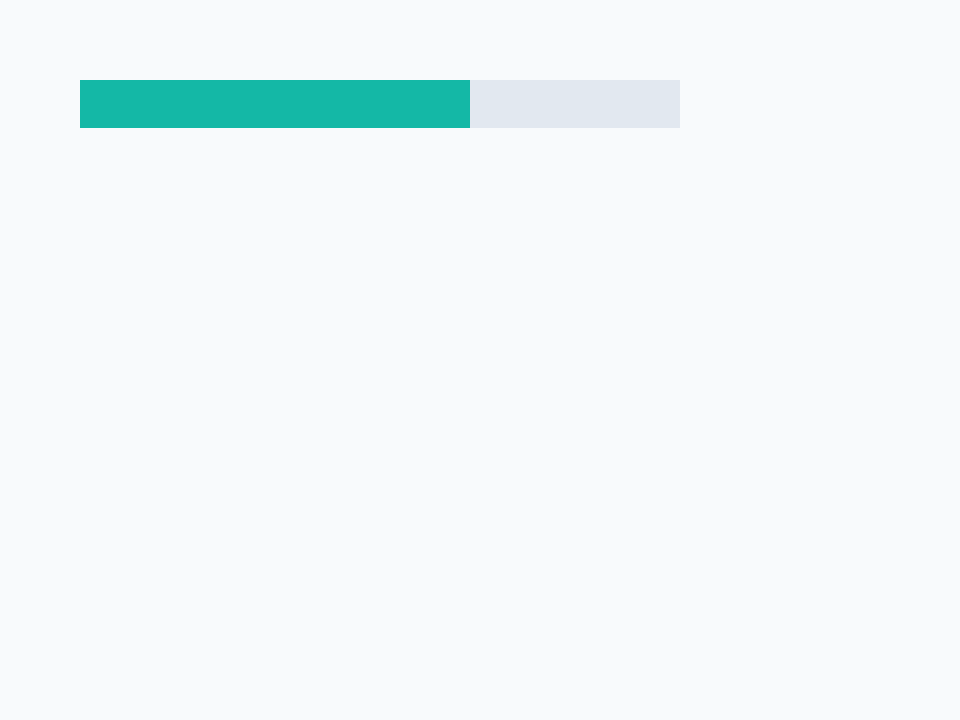
The handler stores the value it kept in range by setting the property itself: a pass would have stored 140, the value as it was set, and the first line would say 300 140.
Words in this lesson
Each one finds every lesson that uses it. The Dictionary has the whole story of each, with its syntax and more examples.